
Looking for the best Gemini AI photo editing prompts to transform your ordinary photos into stylish, professional-looking portraits? This collection includes two detailed copy-paste prompts designed for different fashion styles: a luxury black suit portrait and a modern casual streetwear portrait.
Each prompt includes specific instructions for clothing, pose, background, lighting, camera composition, and realistic skin texture. Simply upload your photograph to Google Gemini, copy your preferred prompt, and generate a personalized image.
Whether you prefer a sophisticated formal look or a relaxed streetwear aesthetic, these prompts provide a practical starting point for creating high-quality AI-edited portraits while keeping your natural facial identity recognizable.
Ai photo editing prompt
Gemini AI Photo Editing Prompts
◉ 18 Views♡ 0 Likes
Prompt 1
Luxury Black Suit Portrait
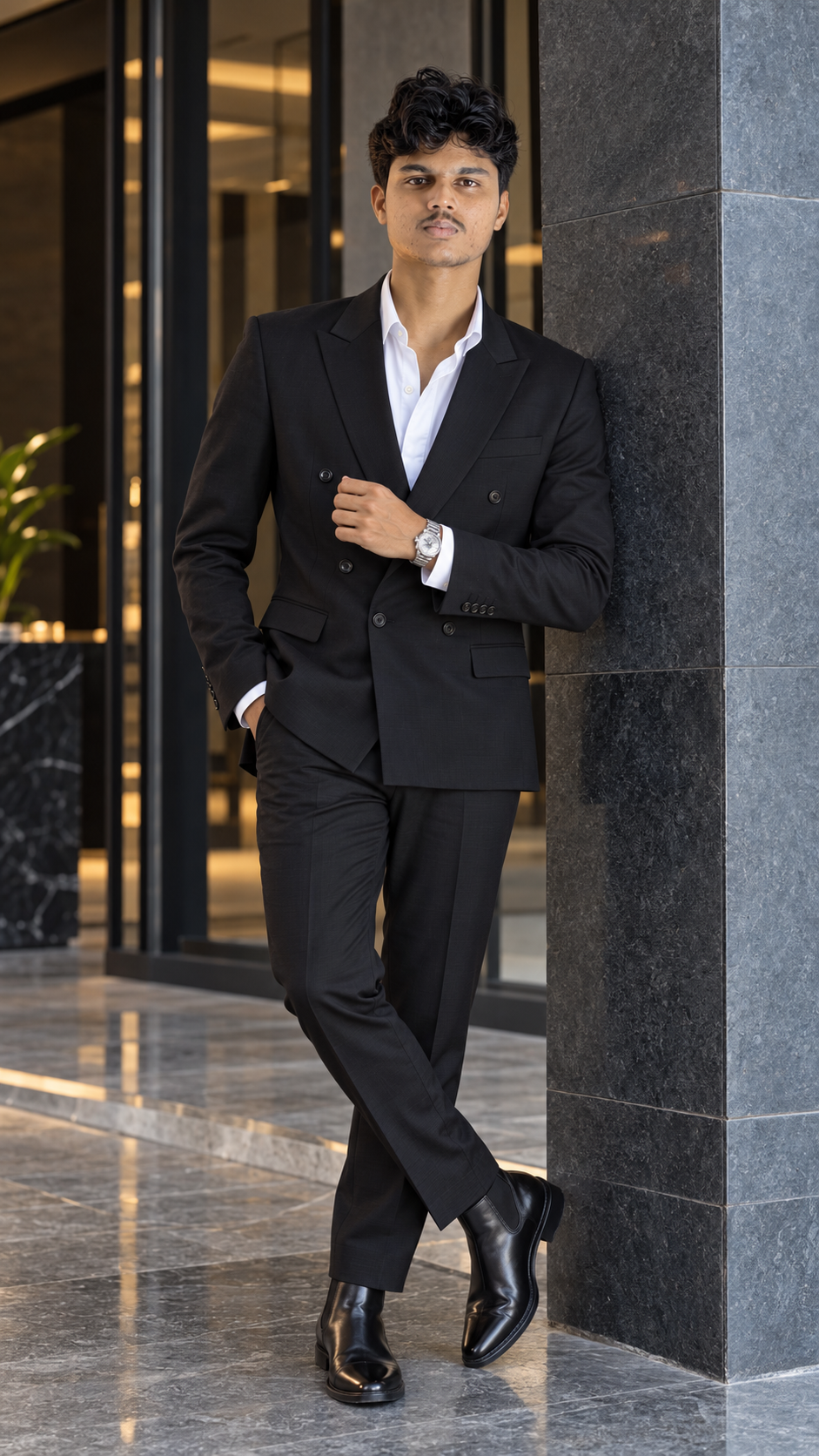
Transform my uploaded photograph into an ultra-realistic luxury fashion portrait using Google Gemini. Use my uploaded photograph as the primary reference and preserve my exact facial identity, natural skin tone, hairstyle, age, and recognizable facial features.rnrnOUTFIT: Dress me in a perfectly tailored black double-breasted suit with subtle premium fabric texture, a crisp white shirt with the top button open, polished black leather Chelsea boots, and a minimalist silver wristwatch. The suit should fit naturally, with realistic stitching, clean lapels, and authentic fabric folds. Do not add a tie.rnrnPOSE: I am standing confidently beside a modern architectural wall. One hand is adjusting my suit cuff while the other rests naturally inside my trouser pocket. Keep my shoulders relaxed, posture upright, and expression calm and confident. My hands must have anatomically correct fingers and natural proportions.rnrnBACKGROUND: Place me inside an elegant contemporary building featuring dark stone walls, large glass panels, minimalist architecture, and a polished stone floor. The setting should resemble a real luxury hotel or sophisticated architectural interior.rnrnLIGHTING: Use soft, professional portrait lighting with gentle shadows on the face and natural highlights along the suit. Preserve accurate skin tones and visible details in the black fabric. Avoid overexposure, artificial glowing edges, and excessive contrast.rnrnCAMERA: Professional full-frame fashion photography, 85mm portrait lens aesthetic, realistic perspective, sharp focus on the eyes, natural depth of field, and a full-body composition. Keep the complete outfit and both shoes visible.rnrnFACIAL REALISM: Preserve my original facial structure, natural skin pores, subtle facial imperfections, authentic hair texture, realistic eye reflections, and natural facial asymmetry. Do not replace my face with another person's face or make me look artificially beautified.rnrnIMAGE QUALITY: High-resolution photographic detail, realistic fabric rendering, accurate shadows, balanced colors, lifelike materials, and professional fashion-editorial composition.rnrnNEGATIVE INSTRUCTIONS: No face replacement, no plastic skin, no excessive beauty filters, no artificial facial symmetry, no exaggerated muscles, no distorted hands, no extra fingers, no duplicated limbs, no floating feet, no unrealistic clothing folds, no fake logos, no text, and no watermarks.rnrnFINAL RESULT: A premium, photorealistic luxury fashion portrait that looks like a genuine photograph captured by a professional fashion photographer. Maintain my recognizable identity, realistic skin texture, natural body proportions, and authentic clothing details.
Prompt 2
Premium Casual Streetwear Portrait
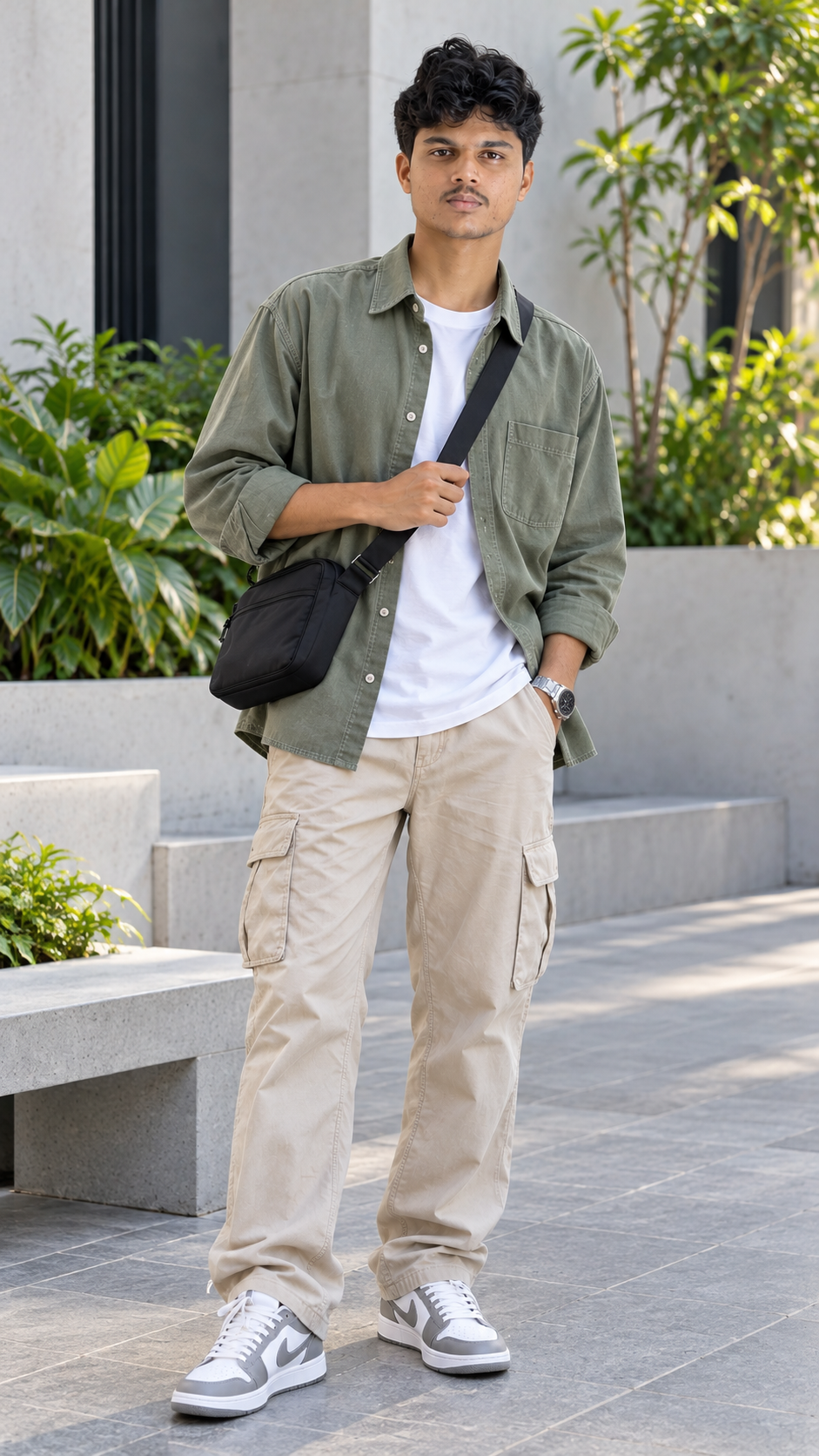
Edit my uploaded photograph into an ultra-realistic contemporary streetwear fashion portrait using Google Gemini. Preserve my exact facial identity, natural skin tone, hairstyle, age, and recognizable facial features from the original reference photograph.rnrnOUTFIT: Dress me in an oversized muted sage-green overshirt with visible stitching and natural fabric folds, a clean white heavyweight T-shirt, relaxed-fit beige cargo trousers, and premium white-and-grey sneakers. Add a subtle black crossbody bag and a minimalist wristwatch. All clothing should fit naturally and display realistic materials, seams, and wrinkles.rnrnPOSE: I am standing casually beside a minimalist concrete bench. One hand holds the strap of my crossbody bag while the other rests naturally inside my trouser pocket. My shoulders are relaxed, my posture is confident, and my expression is natural. Keep my hands, arms, and legs anatomically correct.rnrnBACKGROUND: Place me in a modern architectural courtyard with pale concrete walls, geometric seating, carefully arranged green plants, and clean stone flooring. Include realistic architectural details and enough background space to keep the main subject clearly visible.rnrnLIGHTING: Use soft, diffused daylight with balanced exposure, gentle shadows, and neutral colors. Maintain accurate skin tones and realistic highlights on the overshirt and sneakers. Do not use golden-hour lighting, neon lighting, or rainy-night effects.rnrnCAMERA: Professional lifestyle fashion photography, 50mm lens aesthetic, natural perspective, sharp facial details, realistic depth of field, and a full-body vertical composition. Keep the entire outfit and both shoes visible.rnrnFACIAL REALISM: Preserve my original face and natural skin texture. Include realistic skin pores, subtle facial imperfections, natural hair strands, and authentic eye reflections. Do not reshape my nose, jawline, eyes, or other recognizable facial features.rnrnPHOTOGRAPHIC QUALITY: High-resolution image detail, realistic clothing textures, natural shadows, accurate anatomy, balanced colors, and a polished but believable editorial finish.rnrnNEGATIVE INSTRUCTIONS: No face replacement, no plastic skin, no cartoon effects, no CGI appearance, no exaggerated body proportions, no extra fingers, no deformed hands, no duplicated limbs, no floating objects, no warped shoes, no excessive blur, no fake logos, no text, and no watermarks.rnrnFINAL RESULT: A premium, photorealistic casual streetwear portrait that looks like a real lifestyle fashion photograph. Keep the person recognizable, the clothing natural, and the architectural background clean and believable.
What These Prompts Create
These Gemini AI photo editing prompts offer two distinct portrait styles.
1. Luxury Black Suit Portrait
The first prompt creates a sophisticated fashion portrait featuring a tailored black suit, white shirt, polished Chelsea boots, and a modern luxury interior. Soft professional lighting, realistic fabric details, and a confident standing pose complete the look.
2. Premium Casual Streetwear Portrait
The second prompt creates a contemporary fashion photograph featuring a sage-green overshirt, white T-shirt, beige cargo trousers, and white-and-grey sneakers. A minimalist architectural courtyard, soft daylight, and natural clothing textures create a clean lifestyle aesthetic.
Both prompts emphasize realistic facial features, natural skin texture, believable anatomy, and detailed clothing. Actual results depend on the reference photograph and the image-editing tool.
1. Luxury Black Suit Portrait
The first prompt creates a sophisticated fashion portrait featuring a tailored black suit, white shirt, polished Chelsea boots, and a modern luxury interior. Soft professional lighting, realistic fabric details, and a confident standing pose complete the look.
2. Premium Casual Streetwear Portrait
The second prompt creates a contemporary fashion photograph featuring a sage-green overshirt, white T-shirt, beige cargo trousers, and white-and-grey sneakers. A minimalist architectural courtyard, soft daylight, and natural clothing textures create a clean lifestyle aesthetic.
Both prompts emphasize realistic facial features, natural skin texture, believable anatomy, and detailed clothing. Actual results depend on the reference photograph and the image-editing tool.
How to Use These Prompts
Follow these steps to use the Gemini AI photo editing prompts:
1. Open Google Gemini.
2. Upload a clear photograph of yourself.
3. Choose either the luxury black suit prompt or the casual streetwear prompt.
4. Copy the complete prompt and paste it into the image-editing instructions.
5. Ask Gemini to preserve your original facial identity and natural skin tone.
6. Generate the edited image.
7. Check the face, hands, clothing, and background for visual errors.
8. If necessary, regenerate the image with more specific instructions.
9. Save the highest-resolution version available.
Tip: Start with a clear reference photograph. Although identity-preservation instructions can help, AI tools may still alter some facial details.
1. Open Google Gemini.
2. Upload a clear photograph of yourself.
3. Choose either the luxury black suit prompt or the casual streetwear prompt.
4. Copy the complete prompt and paste it into the image-editing instructions.
5. Ask Gemini to preserve your original facial identity and natural skin tone.
6. Generate the edited image.
7. Check the face, hands, clothing, and background for visual errors.
8. If necessary, regenerate the image with more specific instructions.
9. Save the highest-resolution version available.
Tip: Start with a clear reference photograph. Although identity-preservation instructions can help, AI tools may still alter some facial details.
Tips for Better Results
- Use a clear reference photograph with your face visible.
- Choose a photograph with natural skin tones and sufficient facial detail.
- Keep the identity-preservation instructions unchanged.
- Select the black suit prompt for a luxury formal look.
- Select the streetwear prompt for a modern casual fashion look.
- Request realistic fabric stitching and natural clothing folds.
- Use balanced lighting to maintain accurate skin tones.
- Avoid excessive skin smoothing and artificial facial symmetry.
- Check the hands, fingers, footwear, and body proportions.
- Generate multiple versions and select the most natural-looking result.
Who Are These Prompts For?
These Gemini AI photo editing prompts are suitable for:
- Boys and men who want stylish AI-edited portraits.
- Instagram users creating profile pictures and fashion posts.
- Social media creators preparing attractive portrait content.
- Fashion enthusiasts experimenting with different outfits.
- Students and professionals looking for polished personal photographs.
- Beginners learning to use AI image-editing tools.
- Bloggers who want to experiment with luxury and casual fashion aesthetics.
Both prompts can be customized with different clothing colors, accessories, and backgrounds while retaining the original person's recognizable features.
- Boys and men who want stylish AI-edited portraits.
- Instagram users creating profile pictures and fashion posts.
- Social media creators preparing attractive portrait content.
- Fashion enthusiasts experimenting with different outfits.
- Students and professionals looking for polished personal photographs.
- Beginners learning to use AI image-editing tools.
- Bloggers who want to experiment with luxury and casual fashion aesthetics.
Both prompts can be customized with different clothing colors, accessories, and backgrounds while retaining the original person's recognizable features.
More Details
Prompt Collection: Gemini AI Photo Editing Prompts
Number of Prompts: 2
Prompt 1 Style: Luxury formal fashion.
Prompt 1 Outfit: Black double-breasted suit, white shirt, Chelsea boots, and silver wristwatch.
Prompt 1 Background: Modern luxury architectural interior.
Prompt 2 Style: Contemporary casual streetwear.
Prompt 2 Outfit: Sage-green overshirt, white T-shirt, beige cargo trousers, white-and-grey sneakers, and black crossbody bag.
Prompt 2 Background: Minimalist architectural courtyard.
Photography Style: Realistic fashion and lifestyle photography.
Recommended Aspect Ratios: 4:5 for Instagram portrait posts, 9:16 for Stories and Reels covers, or 3:4 for vertical portraits.
Image Quality: Use the highest resolution available from your image-editing tool.
Customization: Change the outfit, accessories, or background to experiment with different styles. Keep the facial identity instructions if you want the result to resemble your reference photograph.
Important: AI-generated images can contain visual imperfections. Review facial details, hands, clothing edges, and other fine elements before publishing.
Number of Prompts: 2
Prompt 1 Style: Luxury formal fashion.
Prompt 1 Outfit: Black double-breasted suit, white shirt, Chelsea boots, and silver wristwatch.
Prompt 1 Background: Modern luxury architectural interior.
Prompt 2 Style: Contemporary casual streetwear.
Prompt 2 Outfit: Sage-green overshirt, white T-shirt, beige cargo trousers, white-and-grey sneakers, and black crossbody bag.
Prompt 2 Background: Minimalist architectural courtyard.
Photography Style: Realistic fashion and lifestyle photography.
Recommended Aspect Ratios: 4:5 for Instagram portrait posts, 9:16 for Stories and Reels covers, or 3:4 for vertical portraits.
Image Quality: Use the highest resolution available from your image-editing tool.
Customization: Change the outfit, accessories, or background to experiment with different styles. Keep the facial identity instructions if you want the result to resemble your reference photograph.
Important: AI-generated images can contain visual imperfections. Review facial details, hands, clothing edges, and other fine elements before publishing.